Saturday, March 27, 2010


Tuesday, November 17, 2009
My Antivirus Trifecta!
Download The Antivirus Trifecta
Sunday, May 10, 2009
Wednesday, May 6, 2009
Low down dirty virus blues
I had a major virus. Not just simple adware that I can get rid of in a half an hour, but an adware infected virus complete with a trojan. This piece of shit not only set my clock to 7pm, September 4th 2021 at random intervals, killing off any software registration including virus protection, it had an audible file. Every hour or so, this file would run some sort of audio. This was completely random from the odd little beep to a grinding/humming noise to a five minute red carpet interview (I shit you not).
Anyway, it also disabled the ports that allow antivirus progz to download updates, and replaced every file I was able to manually delete. It also replaced registry values I changed immediatly after fixing them. Lets just say I had a slight problem killing this thing off. When it came down to it, the only antivirus that would do anything permanent was completely free, and I will tell you which at a later date.
The reason I am writing this is simple. Pay attention. I did not. The antivirus worked too well. By the time I had found something that worked, the virus had infected so much of my operating system, there was nothing I could do to save it.
The only problem was, I did not have a backup plan this time. Usually, I have an extra HD with a newly installed OS hanging around somewhere. Not this time. Usually, I use System Restore to make backups. Virus disabled it.
I ran the antivirus, and it found many many files that I should have payed more attention too. I did not. I hit quarantine, immediately noticing that Explorer.exe was one of the infected files. Anyway, the files were all quarantined, and not paying any attention at all, I rebooted my computer.
Obviously, the OS did not boot, I got a blank screen with my chosen backdrop colour. CTRL+ALT+DELETE did not work, or anything else I tried, including a bunch of preboot ideas.
To make an immense story longer, I have no computer now, and am currently typing on an Mac OSuX. So,......PAY ATTENTION!!! Don't make the same retarded mistake I did.
Wednesday, April 29, 2009
KillBox

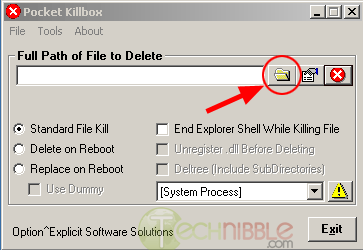
Killbox is a tiny proggie that you can download and run without installation. It's main purpose is a dirty, manual antivirus. Simply put, it's your job to figure out what programs are infected on your computer, and remember the location. Open Killbox, type or paste in the full location. (example: c:/windows/ntos.exe), select replace on startup, select use dummy, and hit the activate button (Red button with an X).
Screenshot
Quite simply, upon the next reboot, it will find the file, and replace it with an empty file with the same name. The virus will not understand that the wrong file is present, and will not try and replace it.
Mind you, this is a last resort, but a helpful one. DO NOT do this to a file unless you are %100 certain it is a virus. Always use a legit antivirus before resorting to such a dirty method.
Note: Always refrain from downloading an antivirus off of a site explaining how to get rid of a specific virus!!! These programs tend to have virus' within them, or, in the best case, it will be a 'free' antivirus that will scan your computer for free, but will not fix anything until you pay up.
Wednesday, April 22, 2009
Tumbnails Speedup
To turn off thumbnailing feature
1. Open the Start Menu (the one with the little Windows logo)
2. Click on Run...
3. Type; regsvr32 /u shmedia.dll
To turn on thumbnailing feature
1. Open the Start Menu (the one with the little Windows logo)
2. Click on Run...
3. Type; regsvr32 shmedia.dll
I hope this was helpfull, if not, it may be in the future. Mind you XP sometimes gets errors from certain previews (of avi files mostly) so knowing how to turn this feature off may be quite helpful at some point.
Aston Shell

Aston is a windows shell replacement. In laymans terms, Aston can become your operating system, and you never have to bother with windows again if you don't want to....I dont...
You can use Aston as a second OS running along side windows, or simply use the shell, and disable windows entirely. Coupled with TaskCatcher and Xplorer2, you can disable windows and windows explorer completly.
My computer has an Aston shell with Xplorer2 and Firefox, and I have Explorer and Internet Explorer black listed so they cannot ever run. For me, it's the perfect OS.
Aston has many extras if you want them. You can have a minimalist system like I created, or all the perks. Have a running clock as your background, or make your operating system run like Winamp, or a Divx player, it's all up to you. If you don't think this is the best thing around, check out these screenshots:
Screenshot 1
Screenshot 2
Screenshot 3
Screenshot 4
Screenshot 5
There are so many things you can do with this program. I have used it for a few years now, and understood the basics immediatly. I am however, still learning alot about it, and finding more and more tricks you can do.
There are of course other shells out there, like Talisman for instance. Talisman is a great shell, and fun to work with, don't get me wrong, but it bugs out even more than explorer.
Try Aston for a month, and you will never get rid of it.
Download Aston
Thursday, April 16, 2009
Phrase Express

Phrase Express is a very usefull program for automating your computer use. type a phrase you use alot, in any program, and select it. Then right click the PE icon, and hit "create new phrase". Now you can set a keystroke to the phrase, and never have to type it out fully again. This works wonders for poeple with keys missing on keyboards. Most companies will charge you an arm and a leg to 'fix your computer', when all they really had to do is attatch a key. Just use this progam, and assign a simple keystroke to replace it. Example:
Keyboard is missing F key.
Assign Alt+V tot he letter FF
Now type something into a text box somewhere,....eg..... {Alt+V}inal {Alt+V)antacy
Phrase Express
Thursday, April 9, 2009
Key Launch

Key launch is an extremely simple program I cannot live without. With a keystroke (cmd+Q) you open a tiny black window. Type in a program's name ,or a nickname you choose if you prefer, and hit enter. The program runs. Simple, to the point. I love this program, and have another program keeping it running no matter what.
I have found it easiest to create an alias folder somewhere on your hd with shortcuts to as many programs as you can find, link it to Key Launch, and start making nicknames. For instance, If I type fox on this computer, Firefox runs. If I type MM Media Monkey runs, and so on.
This one is worth it everyone, so give it a go.
Key Launch
Wednesday, April 8, 2009
Task Catcher

This lady is ready to pounce on any miscreants running around your system. She has two main purposes, to seek, and destroy.
Use one: you can keep a process running no matter what. Add the program to the lady's watch list, and if something tries to close it, the lady will reopen it immediatly. This works great when you mistakenly his an X button that's too damn big, or something is just plain buggy.
Use Two: Make absolutly sure a certain pain in the butt process never runs. I use it on Explorer, and Internet Explorer, since I use neither. No matter what happens, these programs will never run, unless I manually take them off the black list. This works extremely well with adware processes that automatically restart when you quit them. It's difficult to delete a file when it insists on running.
Use Three: You can view not only processes, but paths. If a program is running, it tells you exactly where it is running from, this way, you can easily look up the file online in case it's evil, or find the directory it's in and kill the little bastard.
This file has run on my pc for the last two/three years, and saved this poor old computer more than once,...twice,...thr.....it's been very very helpful.
Task Catcher
Sunday, April 5, 2009
Resplendance - Antifreeze

This little proggie is a very unique task manager. It suspends all running programs. I have a very buggy computer with a 4gig HD. Just running a browser can freeze my computer up. Once running, in the task bar, it will respond to a key command. As long as your cursor still moves, you can hit CTRL+ALT+Home and all apps will be suspended, and Antifreeze Task Manager will run. It is very simple to use, and a must have if your computer is slow.
Resplendance - Antifreeze
Lvl Lord Patcher

lvl lord patcher will open up to 50 ports so your torrents run faster. If you have issues, this proggie is very helpfull.
Lvl Lord Patch
Winsock Quick Fix

Winsock Quick fix is a little proggie you won't need until it's too late. When you can't connect to a perfectly good isp, and you've tried everything else, this will save your ass.
Note: mind the warning icon. If I list a program with the sign, it means download it wether you need it or not. Download it, and store it someplace safe. When you need this program, you WILL NOT be able to download it.
Winsock Quick Fix
Friday, April 3, 2009
Xplorer2

xplorer² is an Explorer replacement program. You can use it along with Windows Explorer, but I have disabled mine, finding xplorer² to be a far better, and far more reliable replacement.
It is fairly simple to use, it has one or two panes, and you can drag and drop from one to the other. You also can have multiple tabs per frame, keeping your most used folders right where you need them. I use the tabs as a sort of favorite places list, though it has that too,...I just dont know how to use that one yet.
There are so many things you can do in the program, but it's better to download it, and read the tutorials, or read what you can from the site. This is my favorite program, and now, I would be lost....completely lost without it.
xplorer²
Thursday, April 2, 2009
Hijackthis

Hijackthis is a simple program for searching out malware, and other harmfull things. It is very simple to use. You can download it below.
HijackThis
Once you have that, you can run it, and have it search for all that bad stuff. Once you have done this, in about 30 seconds to a minute, you should have a long list of things. This list is not of just the bad stuff, it's everything. Now hit create log. In the log file, select all (ctrl+a) and copy (ctrl+c). Now go to HijackThis Security here:
HijackThis Security
Now input the whole log in the big white box and hit Analyze. Now a new page will load with the names and locations of all the files HijackThis found, along with checks or red X's stating wether or not the file is harmless. How you want to get rid of these files is your own concern, but I'll post about things like that in the future.
Welcome to Luke's Computer Tutor And Troubleshooter

This blog is a compilation of fixes and tweaks for the Windows XP operating system.