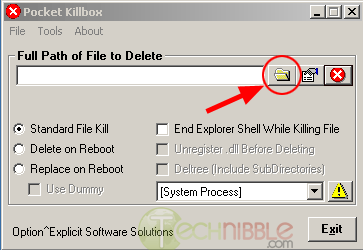

Killbox is a tiny proggie that you can download and run without installation. It's main purpose is a dirty, manual antivirus. Simply put, it's your job to figure out what programs are infected on your computer, and remember the location. Open Killbox, type or paste in the full location. (example: c:/windows/ntos.exe), select replace on startup, select use dummy, and hit the activate button (Red button with an X).
Screenshot
Quite simply, upon the next reboot, it will find the file, and replace it with an empty file with the same name. The virus will not understand that the wrong file is present, and will not try and replace it.
Mind you, this is a last resort, but a helpful one. DO NOT do this to a file unless you are %100 certain it is a virus. Always use a legit antivirus before resorting to such a dirty method.
Note: Always refrain from downloading an antivirus off of a site explaining how to get rid of a specific virus!!! These programs tend to have virus' within them, or, in the best case, it will be a 'free' antivirus that will scan your computer for free, but will not fix anything until you pay up.